Aaj ke digital zamane mein email bhejna ek basic online skill hai. School, college, job, business, online forms, customer support aur personal communication ke liye email ka use bahut common hai. Agar aapne abhi-abhi Gmail account banaya hai aur aapko samajh nahi aa raha ki email kaise bheje, to ye guide aapke liye hai.
Is article mein hum step-by-step dekhenge ki Gmail se email kaise bheje, email mein To, Cc aur Bcc ka kya use hota hai, subject kaise likhein, photo ya document kaise attach karein, mobile se email kaise bheje aur email send hone ke baad uska status kaise check karein.
🔔 Don't miss our latest updates!
Tap the bell icon at the top of this channel to turn on notifications.
Email Bhejne Ke Liye Kya Chahiye?
Email bhejne ke liye sabse pehle aapke paas ek active email account hona chahiye. Gmail ek popular option hai, lekin Outlook, Yahoo Mail aur other email services bhi use ki ja sakti hain.
Aapko generally ye cheezein chahiye:
- Ek active email ID
- Email account ka password
- Internet connection
- Computer, laptop ya smartphone
- Jis person ko email bhejna hai uska email address
Agar aap Gmail use kar rahe hain, to computer par browser mein Gmail open karke apne account mein sign in kar sakte hain.
Gmail Se Email Kaise Bheje?
Gmail se email bhejne ka basic process bahut simple hai. Google ke current Gmail instructions ke according, email likhne ke liye Compose par click karke recipient, subject aur message enter kiya jata hai aur phir Send par click kiya jata hai.
Step 1: Gmail Open Karein
Apne computer ya laptop mein browser open karein aur Gmail par jayein. Apne Gmail account mein sign in karein.
Step 2: Compose Par Click Karein
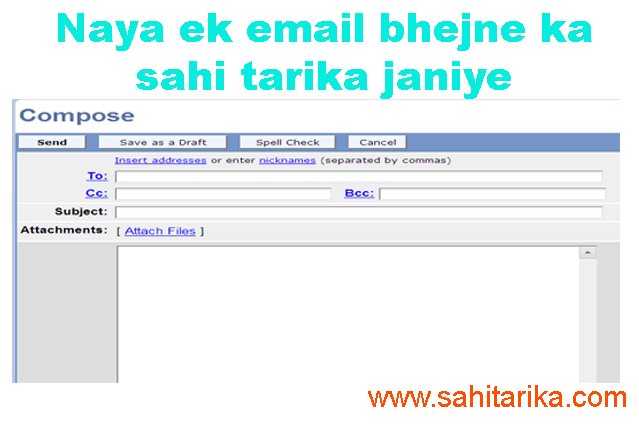
Gmail open hone ke baad left side mein Compose button par click karein. Isse ek new email window open hogi.
Step 3: To Mein Email Address Dalein
To field mein us person ka email address enter karein jisko aap email bhejna chahte hain.
Example:
To: example@gmail.com
Email address type karte waqt spelling dhyan se check karein. Ek chhoti si spelling mistake ke karan email galat address par ja sakta hai ya delivery fail ho sakti hai.
Step 4: Subject Likhein
Subject mein email ka purpose short aur clear words mein likhein. Subject dekhkar recipient ko turant samajh aana chahiye ki email kis baare mein hai.
Example:
- Job Application for Sales Executive
- Request for College Admission Information
- Meeting Regarding Website Project
- Leave Application for 2 Days
Sirf Hello, Important ya Please Read jaise vague subjects ke bajay specific subject likhna better hota hai.
Step 5: Email Ka Message Likhein
Subject ke neeche message box mein apna complete message likhein.
Agar email formal hai, to greeting se start karein, phir apna purpose clearly explain karein aur end mein polite closing use karein.
Example:
Dear Sir/Madam,
I am writing to enquire about the admission process for the upcoming session. Please let me know the eligibility criteria and required documents.
Thank you.
Regards,
Your Name
To, Cc Aur Bcc Kya Hota Hai?
Email likhte waqt aapko To, Cc aur Bcc options dikh sakte hain. Inka purpose samajhna important hai.
To Kya Hota Hai?
To field mein un primary recipients ke email addresses dale jate hain jinse directly communication karna hai.
Example: Agar aap college admission ke baare mein college office ko email bhej rahe hain, to college office ka email address To field mein daal sakte hain.
Cc Kya Hota Hai?
Cc ka matlab Carbon Copy hai. Iska use kisi additional person ko email ki copy bhejne ke liye kiya ja sakta hai.
Cc mein added recipients generally dekh sakte hain ki email aur kin recipients ko bheja gaya hai.
Example: Aap manager ko main email bhej rahe hain aur team leader ko information ke liye copy bhejna chahte hain. Team leader ko Cc mein add kiya ja sakta hai.
Bcc Kya Hota Hai?
Bcc ka matlab Blind Carbon Copy hai. Ismein added recipients dusre Bcc recipients ke email addresses nahi dekh sakte.
Bcc ka use tab useful ho sakta hai jab aap multiple recipients ko email bhej rahe hon aur unke email addresses ko ek doosre se hide rakhna ho.
Google ke Gmail Help ke according, Bcc recipients doosre Bcc recipients ke email addresses nahi dekh sakte. :contentReference[oaicite:1]{index=1}
Gmail Mein Photo Ya Document Kaise Attach Karein?
Agar aapko email ke saath photo, PDF, Word document ya kisi other file ko bhejna hai, to Gmail mein attachment option use kar sakte hain.
Attachment Bhejne Ke Steps
- Gmail mein Compose par click karein.
- Recipient ka email address enter karein.
- Subject aur message likhein.
- Message window ke neeche Attach files icon par click karein.
- Computer se required file select karein.
- Open par click karein.
- File upload hone ka wait karein.
- Attachment ka naam check karein.
- Sab kuch correct hone par Send par click karein.
Google ke official Gmail Help ke mutabik, personal Gmail accounts mein total email attachment limit 25 MB hai. Agar attachment is limit se badi hai, Gmail Google Drive link ka option use kar sakta hai. :contentReference[oaicite:2]{index=2}
Mobile Se Email Kaise Bheje?
Aajkal bahut se users smartphone se email bhejte hain. Gmail app ke through bhi email send karna simple hai.
Mobile Par Gmail Se Email Send Karne Ka Tarika
- Apne smartphone mein Gmail app open karein.
- Apne account mein sign in karein.
- Compose option par tap karein.
- To field mein recipient ka email address enter karein.
- Subject likhein.
- Email ka message type karein.
- Agar required ho to attachment icon se photo ya document add karein.
- Email address aur message dobara check karein.
- Send par tap karein.
Mobile se email bhejte waqt specially email address check karna important hai, kyunki small-screen typing mein spelling mistake hone ki possibility badh sakti hai.
Email Send Karne Se Pehle Kya Check Karein?
Send button dabane se pehle ek baar email ko review karna achchi habit hai.
- Recipient ka email address sahi hai?
- Subject clear hai?
- Message mein spelling mistakes to nahi hain?
- Required attachment add kiya hai?
- Attachment correct file hai?
- Kahin private information galat person ko to nahi ja rahi?
- Cc aur Bcc recipients correct hain?
Especially job application, business communication aur official documents bhejte waqt final review zaroor karein.
Email Send Hone Ke Baad Kaise Check Karein?
Email send karne ke baad Gmail mein Sent section open karke sent message check kiya ja sakta hai.
Agar message send nahi hua hai, to Drafts mein bhi check karein. Gmail aapke message ko draft ke roop mein automatically save kar sakta hai jab aap email compose kar rahe hote hain. :contentReference[oaicite:3]{index=3}
Agar delivery problem hoti hai, to Gmail error message ya delivery failure notification dikha sakta hai. Recipient ko apne Spam ya Junk folder ko check karne ke liye bhi kaha ja sakta hai.
Galti Se Email Send Ho Jaye To Kya Karein?
Kabhi-kabhi Send button click karne ke turant baad humein apni mistake yaad aati hai. Gmail mein Undo Send feature available hai, jisse send karne ke turant baad limited time ke andar message cancel kiya ja sakta hai.
Gmail settings mein Undo Send cancellation period ko 5, 10, 20 ya 30 seconds tak set kiya ja sakta hai. :contentReference[oaicite:4]{index=4}
Isliye important email bhejte waqt send karne ke baad turant screen ko ignore karne ke bajay confirmation message par dhyan dena useful hai.
Email Ko Baad Mein Send Kaise Karein?
Agar aap email abhi likhna chahte hain lekin kisi specific time par bhejna chahte hain, Gmail mein Schedule send option available hai.
Compose window mein email prepare karne ke baad Send button ke paas available options se Schedule send select kiya ja sakta hai. :contentReference[oaicite:5]{index=5}
Ye feature birthday wishes, reminders, work communication aur planned messages ke liye useful ho sakta hai.
Ek Achcha Email Kaise Likhein?
Sirf email send karna hi enough nahi hai. Message ko clear aur easy-to-understand banana bhi important hai.
1. Clear Subject Likhein
Subject se recipient ko email ka purpose samajh aana chahiye.
2. Short Introduction Dein
Agar recipient aapko nahi jaanta hai, to beginning mein apna short introduction dein.
3. Main Point Clearly Likhein
Email ke main purpose ko unnecessary long introduction ke bina explain karein.
4. Important Information Organize Karein
Agar multiple points hain, to bullet points ya short paragraphs use karein.
5. Polite Closing Karein
Email ke end mein Regards, Thank you ya situation ke according appropriate closing use karein.
Email Bhejte Samay Common Mistakes
- Wrong email address par message bhejna
- Subject blank chhod dena
- Attachment lagana bhool jana
- Wrong attachment bhejna
- Bahut lamba aur unclear message likhna
- Formal email mein unnecessary informal language use karna
- Private information wrong recipient ko bhejna
- Send karne se pehle spelling aur recipient details check na karna
Email Aur Personal Information Ke Mamle Mein Savdhan Rahein
Email bhejte waqt personal information share karne mein care rakhein. Password, OTP, banking PIN aur other sensitive credentials ko email ke through kisi unknown person ke saath share nahi karna chahiye.
Agar koi suspicious email aapko urgent payment, password, account verification ya unknown link par click karne ke liye pressure kare, to pehle sender aur link ki authenticity verify karein.
Gmail Se Email Bhejne Ka Short Process
Agar aapko poora process short mein yaad rakhna hai, to ye sequence follow karein:
- Gmail open karein.
- Compose par click karein.
- To field mein recipient ka address dalein.
- Subject likhein.
- Message type karein.
- Required attachment add karein.
- Email ko carefully review karein.
- Send par click karein.
- Sent folder mein message check karein.
Related Guides
Agar aap email use karna seekh rahe hain, to ye related guides bhi useful ho sakti hain:
FAQ: Email Kaise Bheje?
Q1. Gmail se email kaise bheje?
Gmail open karke Compose par click karein, recipient ka email address To field mein dalein, subject aur message likhein aur Send par click karein.
Q2. Mobile se email bhej sakte hain?
Haan. Gmail app ke through smartphone se email send kiya ja sakta hai. Aap recipient, subject, message aur attachment add karke Send kar sakte hain.
Q3. Email mein CC ka kya use hai?
CC ka use kisi additional recipient ko email ki copy bhejne ke liye kiya jata hai. CC mein added recipients generally other visible recipients ko dekh sakte hain.
Q4. BCC ka kya matlab hai?
BCC ka matlab Blind Carbon Copy hai. Iska use recipient ka email address other BCC recipients se hide rakhne ke liye kiya ja sakta hai.
Q5. Gmail mein PDF kaise bheje?
Compose window open karein, Attach files icon par click karein, PDF select karein aur upload complete hone ke baad Send par click karein.
Q6. Gmail mein attachment ki maximum size kitni hai?
Personal Gmail accounts ke liye total attachment size limit 25 MB hai. Larger files ke liye Gmail Google Drive ka option use kar sakta hai. :contentReference[oaicite:6]{index=6}
Q7. Galti se email bhej diya to kya karein?
Send karne ke turant baad Gmail mein Undo option available ho sakta hai. Undo Send cancellation period settings mein 5 se 30 seconds ke beech set kiya ja sakta hai. :contentReference[oaicite:7]{index=7}
Conclusion
Ab aap samajh gaye honge ki email kaise bheje aur Gmail se email send karne ke liye kaun-kaun se steps follow karne hote hain. Basic process simple hai: Compose open karein, recipient add karein, clear subject likhein, message type karein, zarurat ho to attachment add karein aur details check karne ke baad Send karein.
Shuruat mein To, Cc, Bcc aur attachment jaise options thode confusing lag sakte hain, lekin kuch emails bhejne ke baad ye process aasaan ho jata hai. Important emails ke liye hamesha recipient, subject, message aur attachment ko Send karne se pehle ek baar check karein.
Official reference: Gmail ke current email sending aur attachment instructions ke liye Google Gmail Help aur Gmail Attachment Help dekhein.