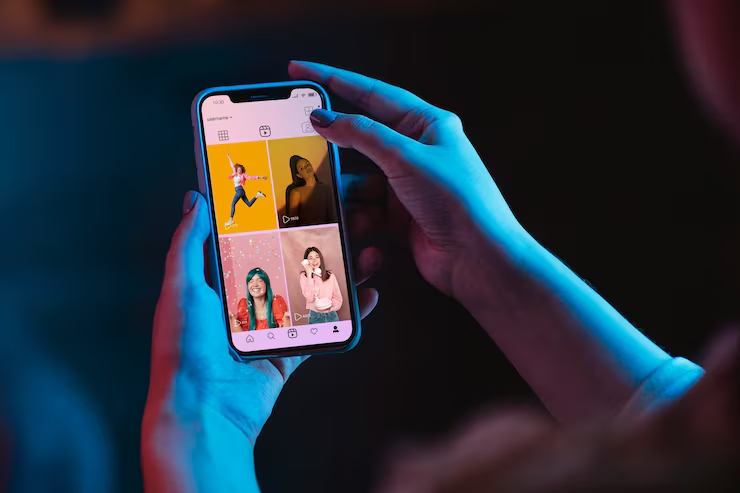
Instagram Grid Format 2026 ko lekar agar aap confused hain, to aap akela nahi hain. Instagram ne traditional square profile-grid experience se kaafi had tak shift kiya hai, aur 2025 ke baad profile par photos aur videos ka preview pehle ki tarah simple square boxes me nahi dikhta. Iske saath Instagram ne creators ko profile ko zyada flexible tarike se manage karne ke liye naye options bhi dene shuru kiye hain.
🔔 Don't miss our latest updates!
Tap the bell icon at the top of this channel to turn on notifications.
2025 me Instagram ne profile grid ko taller, rectangular presentation ki taraf move kiya. Instagram ke head Adam Mosseri ne is change ka reason batate hue kaha tha ki platform par upload hone wale bahut se photos aur videos vertical hote hain, isliye rectangular presentation unhe kam crop karke dikhane me better fit hoti hai.
2026 me ek aur important development aaya: Instagram ne profile grid ke posts ko reorganize karne ka option broadly roll out kiya, jisse users apne existing posts ko profile par desired order me arrange kar sakte hain.
Is guide me hum samjhenge ki Instagram ka current grid kaise kaam karta hai, post design karte waqt kin dimensions aur safe areas ka dhyan rakhna chahiye, purane posts ke saath kya karna hai aur 2026 me apni profile ko visually professional kaise banayein.
Instagram Ka New Grid Format Kya Hai?
Instagram ka traditional profile grid years tak square thumbnails ke liye jaana jaata tha. Isi wajah se creators apne feed ko 1:1 square images ke according carefully plan karte the.
2025 me Instagram ne profile-grid presentation ko taller rectangular format ki taraf shift kiya. Is change ka main purpose vertical photos aur videos ko profile par zyada naturally display karna tha, kyunki mobile users increasingly portrait-oriented content upload karte hain.
Iska practical meaning ye hai ki agar aapne purane time me apne posts ko sirf square thumbnail ko dhyan me rakhkar design kiya tha, to aaj profile visit karne par unka visual appearance different lag sakta hai.
Lekin ek important clarification hai:
- Grid thumbnail ka display format aur actual post format ek hi cheez nahi hain.
- Aapko har Instagram content ko automatically square banana zaroori nahi hai.
- Reels aur Stories ke dimensions alag hote hain.
- Feed post aur carousel ke liye portrait layouts ka use kiya ja sakta hai.
- Profile grid me important text ko edge par rakhna avoid karna chahiye.
Isliye 2026 me Instagram content design karte waqt sirf “square grid” ko target karna outdated approach hai.
Instagram Grid Ke Liye Kaunsa Size Use Karein?
Instagram par upload format aur profile-grid preview ko alag samajhna bahut important hai. Ek post jis ratio me upload hoti hai, profile par uska thumbnail usi tarah exactly appear kare, ye zaroori nahi.
Feed creatives ke liye 4:5 portrait format, jaise 1080 × 1350 pixels, ek practical design size hai. Reels aur Stories ke liye commonly used vertical canvas 1080 × 1920 pixels, yani 9:16 hai.
Meta ke creator-focused material me bhi Instagram ke liye 4:5 feed/carousel aur 9:16 Reels/Stories formats ko highlight kiya gaya hai.
| Content Type | Practical Format | Main Use |
|---|---|---|
| Feed Post | 4:5 | Portrait photos, graphics aur educational posts |
| Carousel | 4:5 | Multiple slides, tutorials aur educational content |
| Reels | 9:16 | Short-form vertical video |
| Stories | 9:16 | Temporary vertical content |
| Profile Grid | Taller rectangular preview | Profile-level content presentation |
Pro Tip: Agar aap graphic design kar rahe hain, to important headline, logo, face aur CTA ko canvas ke extreme edges par place na karein. Isse profile thumbnail ya different device presentation me information cut hone ka risk kam hota hai.
2026 Me Instagram Grid Me Kya Badla Hai?
2026 me sabse important development sirf grid ka rectangular appearance nahi hai. Instagram profile customization ko bhi gradually expand kar raha hai.
Meta ne 2025 me announce kiya tha ki users ko apne profile grid ke posts ko reorder karne ki flexibility dene par kaam kiya ja raha hai.
2026 me ye capability users ke liye rollout hui, jisse profile ke existing posts ko desired order me arrange karna possible ho gaya. Iska benefit especially creators, photographers aur businesses ko ho sakta hai jo profile ko portfolio ki tarah use karte hain.
Example ke liye, maan lijiye aapke profile par:
- Purane low-quality posts hain
- Important portfolio work neeche chala gaya hai
- Brand introduction scattered hai
- Best-performing content visually inconsistent hai
Aise situation me profile ko completely delete karke dobara start karne ki zaroorat nahi. Agar aapke account me grid-reordering option available hai, to existing posts ko better sequence me arrange karna useful ho sakta hai.
Ye change Instagram profile ko ek simple chronological photo album ke bajay ek more intentional visual portfolio ki tarah use karne ka opportunity deta hai.
Instagram Grid Ko Professional Kaise Banayein?
Professional-looking grid ka matlab ye nahi ki har post exactly same colour ya template me honi chahiye. Excessive uniformity kabhi-kabhi profile ko boring bhi bana sakti hai.
Better approach hai ki aap ek visual identity maintain karein.
1. Consistent Typography Rakhein
Agar aap educational ya business content publish karte hain, to 2–3 consistent fonts ka use karein. Har post me completely different typography use karne se profile visually disconnected lag sakti hai.
2. Brand Colours Define Karein
Apne brand ke 2–4 primary colours select karein. Har post me sabhi colours use karna zaroori nahi hai. Bas overall profile me visual connection feel hona chahiye.
3. Important Text Center-Safe Rakhein
Headline, price, logo, face ya CTA ko bilkul left/right edge par place na karein. Profile-grid preview me cropping ya different presentation ki wajah se edge content less visible ho sakta hai.
4. Thumbnail Ko Alone Test Karein
Publish karne se pehle apni design ko small thumbnail size me dekhein. Agar small preview me headline samajh nahi aa rahi hai, to full-size design bhi necessarily effective nahi hogi.
5. Every Post Ko Same Template Na Banayein
Ek consistent identity useful hai, lekin har post ko exact duplicate template me banana creativity reduce kar sakta hai. 3–4 related design styles ke through variety create karein.
Purane Instagram Posts Ka Kya Karein?
2025 ke grid change ke baad bahut se creators ko laga ki unhe apne hundreds of old posts delete karne padenge. Generally aisa karna necessary nahi hai.
Sabse pehle apne existing profile ko audit karein:
- Profile ko normal visitor ki tarah dekhein.
- Top visible posts identify karein.
- Low-quality ya outdated posts mark karein.
- Important portfolio posts identify karein.
- Posts ke thumbnails ko check karein.
- Available grid customization options check karein.
Har old post ko delete karna usually sensible strategy nahi hai. Kuch posts historical value, social proof ya useful information provide kar sakti hain.
Delete karne ke bajay, agar appropriate ho, to archive ya profile customization options ka use consider karein.
Important: Sirf grid ke appearance ki wajah se high-performing post delete na karein. Pehle check karein ki us post se profile visits, comments, saves, shares ya business enquiries aa rahi hain ya nahi.
Instagram Grid Aur Reels Ko Saath Me Kaise Plan Karein?
2026 ka Instagram sirf static photos ka platform nahi hai. Reels discovery aur audience reach ke liye important role play karte hain. Meta ne India me Reels-first experience bhi test kiya hai, jo short-form video ke growing importance ko highlight karta hai.
Isliye aapki Instagram strategy me grid aur Reels ko separate worlds ki tarah nahi dekhna chahiye.
Ek practical content structure ho sakta hai:
- Reels: New audience tak reach aur discovery.
- Carousels: Detailed educational information.
- Single-image posts: Announcements, quotes, branding ya important updates.
- Stories: Daily interaction aur community building.
- Profile grid: Visitor ko account ki overall identity samjhane ka visual layer.
Agar aap Instagram par growth bhi improve karna chahte hain, to Instagram Par Fast Growth Kaise Paaye wali guide ko bhi follow karein.
Followers grow karne ke liye specifically Instagram Followers Kaise Badhaye wali updated strategy bhi useful hai.
Instagram Grid Design Me Common Mistakes
Grid update ke baad kuch mistakes especially common ho gayi hain. Inhe avoid karke aap profile ko cleaner aur more professional bana sakte hain.
- Important text edges par rakhna: Thumbnail presentation me readability reduce ho sakti hai.
- Har post ko square-only design karna: Modern vertical content ko unnecessarily restrict karta hai.
- Too much text: Small thumbnail par long paragraphs readable nahi hote.
- Low-resolution graphics: Professional appearance damage hoti hai.
- Inconsistent branding: Har post completely different visual language use karna.
- Old posts blindly delete karna: Useful social proof lose ho sakta hai.
- Grid ko growth algorithm samajhna: Attractive grid profile conversion me help kar sakta hai, lekin sirf grid format automatically reach guarantee nahi karta.
- Reels thumbnail ignore karna: Video content ka profile-level appearance bhi important ho sakta hai.
Sabse important distinction ye hai ki better-looking grid aur better reach ek hi cheez nahi hain. Aapka grid profile ko professional bana sakta hai, lekin content quality, relevance aur audience response growth ke liye alag factors hain.
Instagram Grid Ko 2026 Me Update Karne Ki Step-by-Step Strategy
Agar aap apne existing account ko 2026 ke current Instagram experience ke according refresh karna chahte hain, to ye process follow kar sakte hain:
- Step 1 – Profile audit karein: Pehle 9–12 visible posts ko visitor ki nazar se dekhein.
- Step 2 – Best posts identify karein: Portfolio, important information aur strongest content ko mark karein.
- Step 3 – Weak thumbnails identify karein: Aise thumbnails note karein jisme text unreadable ya composition confusing ho.
- Step 4 – New designs ko portrait-first rakhein: Feed creatives banate waqt 4:5 jaise practical portrait format ko consider karein.
- Step 5 – Safe zone maintain karein: Main text aur important visual elements ko center ke relatively safe area me rakhein.
- Step 6 – Grid options check karein: Agar aapke account me post-reordering feature available hai, to profile sequence ko organize karein.
- Step 7 – Reels thumbnails review karein: Important Reels ke cover ko profile ke overall visual identity ke saath align karein.
- Step 8 – Performance data check karein: Sirf looks nahi, balki reach, saves, shares, profile visits aur follows bhi evaluate karein.
Agar aap regular content publish karte hain, to scheduling workflow bhi useful ho sakta hai. Aap Instagram Posts Schedule Karne Ka Tarika bhi dekh sakte hain.
Instagram account setup ya professional profile basics ke liye Instagram Account Kaise Banayein guide bhi helpful hai.
Related Instagram Articles
- Instagram Par Fast Growth Kaise Paaye? 2026 Guide
- Instagram Followers Kaise Badhaye? 10 Best Organic Tarike
- Instagram Se Paise Kaise Kamaye? 2026 Guide
- Instagram Blue Tick Kaise Milega? 2026 Ka Complete Guide
Instagram se related aur guides ke liye Sahi Tarika ki Instagram category visit karein.
Frequently Asked Questions
1. Instagram ka new grid format kya hai?
Instagram ne traditional square profile-grid presentation ko taller rectangular thumbnails ki taraf shift kiya hai. Is change ka purpose vertical photos aur videos ko profile par better display karna hai.
2. Kya Instagram ka grid ab square nahi hai?
Traditional square-only profile presentation ab current Instagram experience ka primary format nahi hai. Profile thumbnails taller rectangular appearance me dikh sakte hain.
3. Instagram post ke liye 1080 × 1350 size use kar sakte hain?
Haan. 1080 × 1350 pixels, yani 4:5 portrait format, feed posts aur carousels ke liye ek practical design size hai.
4. Kya Instagram Reels ka size alag hota hai?
Haan. Reels aur Stories ke liye 9:16 vertical format commonly used hai. 1080 × 1920 pixels ek practical canvas size hai.
5. Kya purane Instagram posts delete karne padenge?
Nahi. Sirf grid update ke reason se old posts delete karna necessary nahi hai. Pehle unke performance, relevance aur profile appearance ko evaluate karein.
6. Kya new grid format se Instagram reach automatically badhegi?
Nahi. New grid presentation ko automatic reach guarantee nahi samajhna chahiye. Grid profile appearance ko improve kar sakta hai, jabki reach content aur audience response jaise multiple factors par depend karti hai.
7. Kya Instagram profile posts ko 2026 me reorder kar sakte hain?
Instagram ne profile-grid post reordering feature ko roll out kiya hai. Feature availability aur exact interface app version ke according vary ho sakta hai.
8. Instagram grid ko professional kaise banayein?
Consistent visual identity, readable thumbnails, good-quality images, sensible typography aur balanced colours use karein. Har post ko identical banana zaroori nahi hai.
9. Kya Instagram grid growth ke liye important hai?
Grid directly viral growth guarantee nahi karta, lekin jab koi user aapki profile visit karta hai, to organized grid professional impression create kar sakta hai aur follow decision ko influence kar sakta hai.
10. Kya Instagram ke grid format me future me phir change ho sakta hai?
Instagram regularly product aur interface changes test karta hai. Isliye dimensions aur features ko permanently fixed samajhne ke bajay current Instagram app aur official updates ko periodically check karna better hai.